CI/CD Pipeline Architecture
| Attribute | Value |
|---|---|
| Project | Open Projects Hub |
| Version | 3.0 |
| Status | Accepted |
Table of Contents
- CI/CD Pipeline Architecture
- Table of Contents
- 1. Branching Strategy
- 2. Fork Setup & Sync
- 3. Branch Naming Conventions
- 4. PR Conventions
- 5. CI/CD Tool Selection
- 6. Pipeline Stages
- 7. Build and Verification Responsibilities
- 8. Hotfix Process
- 9. Deployment Environment Strategy
- 10. Database Migration Strategy
- 11. Rollback Strategy
- 12. Environment Variables and Secrets Management
- 13. Zero-Downtime Deployment Approach
- 14. Deployment Impact Summary
- Source References
1. Branching Strategy
The project uses a two-branch model (dev + main) with fork-based contributions. All contributors — core team and external — work from forks and submit pull requests to the upstream repository.
feature/<desc>  fix/<desc>  docs/<desc>    ← created from dev in your fork
         │
         ▼
        dev  ───────────────────────────── integration branch (upstream)
         │                                 PR from fork to upstream dev
         │                                 1 approval + CI pass required
         │
         ▼  (PR dev → main)
        main ───────────────────────────── production branch (upstream)
         │                                 PR from upstream dev to main
         │                                 2 approvals + CI pass required
         │                                 merge builds candidate (no deploy)
         │
         ▼  (tag vX.Y.Z on main)
    Production ─────────────────────────── tag triggers deploy pipeline
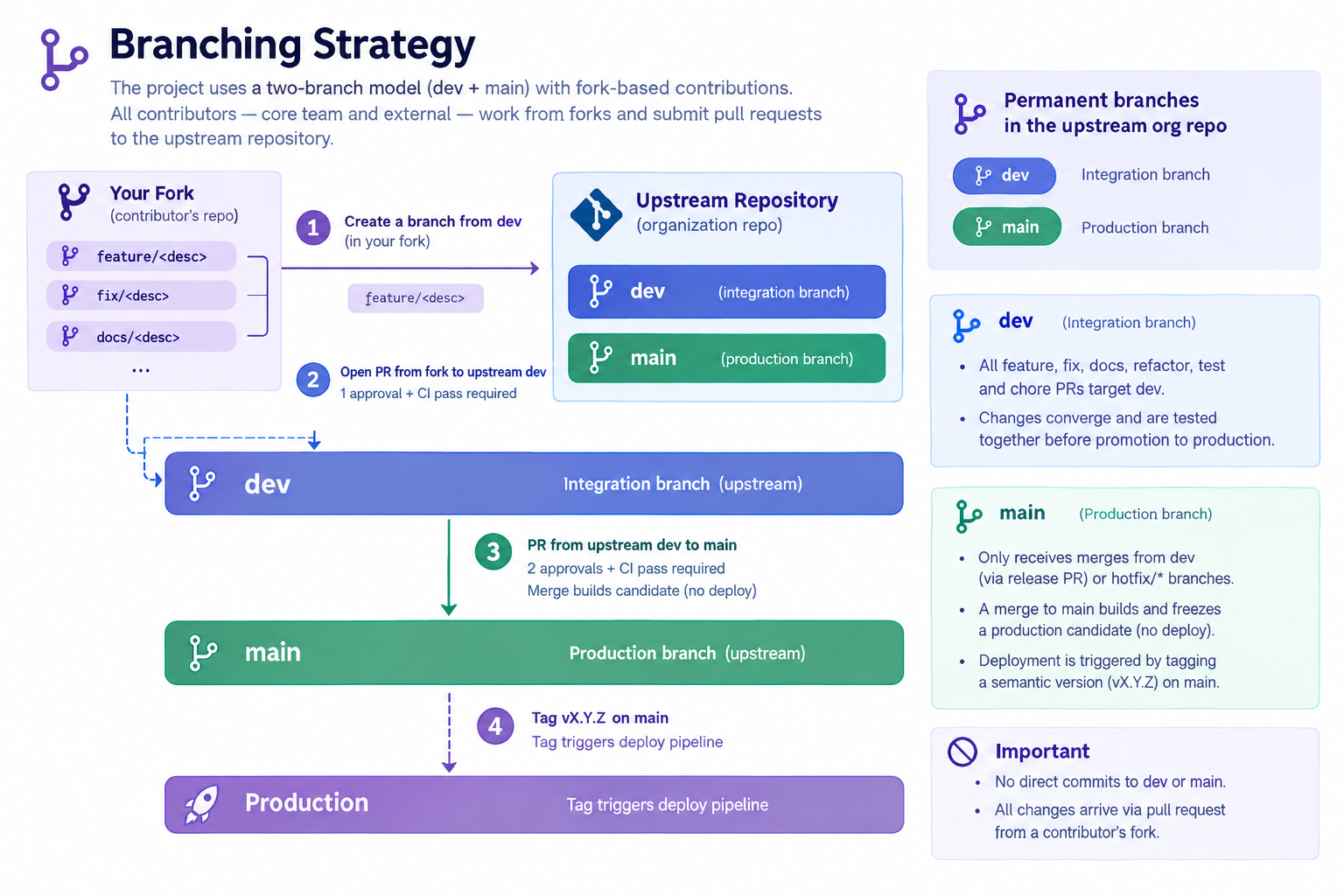
Permanent branches in the upstream org repo: dev, main
dev: Integration branch. All feature, fix, docs, refactor, test, and chore PRs targetdev. This is where changes converge and are tested together before promotion to production.main: Production branch. Only receives merges fromdev(via release PR) orhotfix/*branches. A merge tomainbuilds and freezes a production candidate but does not deploy. Deployment is triggered by tagging a semantic version (vX.Y.Z) onmain.
No direct commits to dev or main. All changes arrive via pull request from a contributor's fork.
Relationship to ADR-016: The branching model, commit conventions, and merge strategy are defined in ADR-016. This document defines the CI/CD pipeline that enforces these conventions.
Branch Protection Rules
| Rule | dev | main |
|---|---|---|
| Direct pushes | ❌ Blocked | ❌ Blocked |
| PR required | ✅ All changes via PR | ✅ All changes via PR from dev or hotfix |
| Required approvals | 1 (when team > 1) | 2 |
| Status checks | ✅ Must pass (lint, test, type-check, docs) | ✅ Must pass (lint, test, type-check, docs) |
| Up-to-date before merge | ✅ Required | ✅ Required |
| Conversation resolution | ✅ Required | ✅ Required |
| Stale reviews | ✅ Dismissed on new commits | ✅ Dismissed on new commits |
| Force pushes | ❌ Blocked | ❌ Blocked |
2. Fork Setup & Sync
One-time Fork Setup
Fork the upstream repository on GitHub, then:
git clone git@github.com:<your-handle>/open-projects-hub.git
cd open-projects-hub
git remote add upstream git@github.com:<org>/open-projects-hub.git
git remote -v
# origin    git@github.com:<your-handle>/open-projects-hub.git (fetch/push)
# upstream  git@github.com:<org>/open-projects-hub.git (fetch/push)
origin is your fork. upstream is the org repo. You push to origin and open PRs targeting upstream.
Keeping Your Fork in Sync
Sync your fork's dev with upstream before starting any new branch:
git fetch upstream
git checkout dev
git rebase upstream/dev
git push origin dev
If your feature branch diverges from dev while in progress:
git checkout feature/add-pipeline-audit
git rebase upstream/dev
git push origin feature/add-pipeline-audit --force-with-lease
3. Branch Naming Conventions
All work branches are created from dev (except hotfixes, which branch from main):
| Branch type | Pattern | Example | Targets |
|---|---|---|---|
| Feature | feature/<short-description> | feature/ai-refinement-ui | dev |
| Bug fix | fix/<issue-description> | fix/login-redirect-loop | dev |
| Documentation | docs/<topic> | docs/update-readme | dev |
| Refactoring | refactor/<component> | refactor/auth-service | dev |
| Tests | test/<scope> | test/auth-endpoints | dev |
| Chores | chore/<task> | chore/update-dependencies | dev |
| Hotfix | hotfix/<description> | hotfix/fix-login-regression | main |
4. PR Conventions
All pull requests follow these conventions:
| Field | Rule |
|---|---|
| Title | Short description in imperative mood (e.g., add pipeline audit endpoint) |
| Target branch | dev for features, fixes, docs, refactors, tests, chores; main for hotfixes |
| Merge strategy | Standard merge commit — preserves full feature branch history (see ADR-016) |
| Required approvals | 1 for PRs targeting dev; 2 for PRs targeting main |
| Self-approval | Not allowed |
| CI gate | All status checks must pass (lint, test, type-check, docs) |
| Unresolved threads | Must be resolved before merge |
| Up-to-date | Branch must be current with target before merge |
Feature PR Flow (target: dev)
# 1. Sync your fork
git fetch upstream
git checkout dev
git rebase upstream/dev
git push origin dev

# 2. Create feature branch
git checkout -b feature/add-pipeline-audit

# 3. Develop and commit using Conventional Commits
git commit -m "feat(api): add pipeline_audit POST endpoint"

# 4. Push to your fork
git push -u origin feature/add-pipeline-audit

# 5. Open PR on GitHub:
#    From: <your-handle>/open-projects-hub:feature/add-pipeline-audit
#    Into: <org>/open-projects-hub:dev
CI runs checks on the PR. After 1 approval and all checks passing, merge via standard merge commit. Delete the fork branch after merge.
Release PR Flow (dev → main)
# Open a PR from upstream dev into upstream main
# Requires 2 approvals and all CI checks passing
# Merge builds and freezes a production candidate — does NOT deploy
Releasing to Production
Once the candidate is signed off, tag the release from upstream main:
git fetch upstream
git checkout main
git rebase upstream/main
git tag v1.0.0
git push upstream v1.0.0
The tag (vX.Y.Z) triggers the production deployment pipeline.
Release Versioning
The project uses semantic versioning (vMAJOR.MINOR.PATCH):
| Segment | Increment when |
|---|---|
MAJOR | Breaking change to a public API or data contract |
MINOR | New feature, backwards-compatible |
PATCH | Bug fix, backwards-compatible |
Hotfixes increment PATCH (e.g., v1.0.0 → v1.0.1). New features shipped via the normal dev → main cycle increment MINOR (e.g., v1.0.1 → v1.1.0).
Commit Conventions
All commits follow Conventional Commits (<type>(<scope>): <description>):
| Type | When to use |
|---|---|
feat | New feature for users |
fix | Bug fix |
docs | Documentation only |
style | Code formatting, whitespace (no logic change) |
refactor | Code change with no functional change |
test | Adding or updating tests |
chore | Build process, tooling, dependencies |
perf | Performance improvements |
ci | CI/CD configuration changes |
Examples:
feat(auth): add JWT refresh token rotationfix(ui): resolve modal close button alignmentdocs(adr): add code quality tooling strategyrefactor(api): extract validation logic to shared module
Enforcement: PR titles are validated via CI (GitHub Actions checks Conventional Commits format). Commit messages are not validated by a local hook, so message format stays friction-free during rapid iteration. Local pre-commit hooks are still used for code quality — Ruff, ESLint, Prettier, mypy, and gitleaks secret detection per ADR-015 — and CI re-runs those checks as the authoritative gate, so a bypassed hook cannot land non-conforming code. CONTRIBUTING.md documents the format with examples for new contributors.
5. CI/CD Tool Selection
Selected: GitHub Actions
Rationale: Native repository integration, environment protection rules for main and dev branches, flexible workflow orchestration, Terraform automation, and release tracking with Sentry.
6. Pipeline Stages
The CI/CD pipeline is designed around the two-branch strategy to ensure code quality and a safe path to production.
7. Build and Verification Responsibilities
-
Feature PR Pipeline (target:
dev): Triggered on every PR from a fork targeting upstreamdev.- Runs all documentation checks, code quality scans, and unit/integration tests.
- Runs the repository's lint, format, security and unit-test checks, and builds the frontend artifacts to ensure validity.
- In the infrastructure repository it runs
terraform fmt -checkandterraform validate. - No deployment occurs from this pipeline.
-
Release PR Pipeline (target:
main): Triggered on a PR from upstreamdevto upstreammain.- This is a governance step. It re-runs the same checks as the feature PR pipeline.
- Requires 2 approvals before merging.
- Merge freezes a candidate — does NOT deploy.
-
Production Deployment Pipeline (trigger: tag
vX.Y.Zonmain):- Backend repository: the workflow verifies the tag and builds and pushes
ghcr.io/alonsovndev/open-projects-hub-api:vX.Y.Z. It does not touch AWS. A person then runsscripts/deploy-release.sh vX.Y.Zfrom a workstation, which runs theophub-prod-deploySSM document on the EC2 host with their own AWS credentials. The host pulls the image and restarts the Docker Compose stack. Alembic migrations run when the API container starts. The script fails if the stack does not start healthy: Docker Compose waits for the API health check (about two minutes at most), then the deploy script waits up to 90 more seconds for/health/ready. - Frontend repository: has no deploy workflow. Cloudflare Builds (GitHub integration) builds the app on every push (
npm run build) and deploys the production branch to Cloudflare Workers withwrangler deploy; other branches get preview deployments.VITE_API_BASE_URLin.env.productionpoints the production build at the API origin. No AWS credentials are involved. - The workflow cannot reach AWS: the production account's service control policies block the GitHub OIDC provider (see ADR-023). It can be run manually from a tag ref to rebuild the image; rolling back means running the script with the previous tag.
- The API workflow requires that the tagged commit is on
main(tag protection limits who can tag, not what is tagged). The deploy script ends with a smoke test through the public URL (API_URL, the Cloudflare API hostname): it expects a JSON 4xx from the API, which tells it apart from Caddy's 404 and from Cloudflare's own error pages. - The GHCR package must be Public, because the host pulls anonymously; a private package makes the deploy fail when the host pulls the image.
- API CI applies every Alembic migration to an empty Postgres and rolls it back, because production runs
alembic upgrade headat container start. The repository integration tests are not part of CI: they are stale and need repair first. - Infrastructure is not applied by the pipeline: Terraform changes are applied locally by the owner after reviewing the plan (see Deployment Architecture). Teardown is also done by hand with
terraform destroyfrom a workstation (steps in the infrastructure README); there is no destroy workflow. The database is deleted with the host and there are no backups. - The deploy script ends with an automated smoke test of the routing (see above). The authenticated flow is still checked by hand after a deploy: log in as the seeded admin and create a project. Self-registration cannot be smoke-tested until an email provider with a verified sending domain is configured, because new users must verify by email.
- Backend repository: the workflow verifies the tag and builds and pushes
8. Hotfix Process
Use hotfixes only for critical production bugs that cannot wait for the normal dev → main cycle. The 2-approval requirement still applies.
-
Sync your fork's
mainwith upstream, then branch from it:git fetch upstreamgit checkout maingit rebase upstream/maingit checkout -b hotfix/fix-login-regression -
Fix, test, push to your fork, and open a PR into upstream
main(2 approvals). -
After merge and approval, tag the hotfix release from upstream
main:git tag v1.0.1git push upstream v1.0.1The tag triggers the production deployment pipeline.
-
Back-merge into upstream
devto keep branches in sync:git fetch upstreamgit checkout devgit rebase upstream/devgit merge upstream/maingit push upstream dev
Recovery: The default is fix-forward — land another hotfix. Redeploying a prior good version is possible by running the deploy workflow on the earlier tag, but fix-forward is the norm.
9. Deployment Environment Strategy
Development happens in the local environments (local, test and container, see ADR-014). AWS hosts a single environment:
- Production: the release shown at the master's review, a single low-cost EC2 host behind Cloudflare (see ADR-021 and ADR-022). It is deployed only from a
vX.Y.Ztag cut frommain.
There is no persistent staging or dev environment on AWS. The dev branch provides code-level integration; the container environment, which runs the same Docker image that is deployed, serves as the pre-release smoke test.
10. Database Migration Strategy
- Migrations are managed via Alembic (see ADR-017) and are versioned and backward-compatible.
- In the production pipeline (triggered by tag
vX.Y.Zonmain), migrations run when the API container starts (alembic upgrade headinscripts/start-api.sh). With a single instance there is no migration race. - A failed migration keeps the API from becoming ready, so the deploy script times out and the workflow fails instead of reporting success against an incorrect schema version.
11. Rollback Strategy
- Application Rollback: Re-run the deploy workflow on the previous tag. For the frontend, re-run its deploy workflow on the previous tag.
- Database Rollback: Prefer forward-fix migrations. There are no database backups (ADR-021), so a destructive migration cannot be undone by restoring data.
- Infrastructure Rollback: Revert the change in the Terraform code and apply it locally.
12. Environment Variables and Secrets Management
- Runtime secrets for production are generated by Terraform (or set by hand) in AWS Systems Manager Parameter Store under
/ophub/prod/. - The deploy script on the host reads them with the instance role and writes a root-only
.envfor Docker Compose. Parameters still set to the placeholderN/Aare skipped, so the variable stays unset. - GitHub holds no AWS keys and no AWS repository variables: workflows do not reach AWS. Deploys use the operator's own AWS credentials from a workstation.
- No plaintext secrets are ever stored in the repository.
13. Zero-Downtime Deployment Approach
- Zero-downtime deployment is not provided: the single EC2 host restarts the API container on each deploy, so expect a short interruption (ADR-021).
- Database migrations are written to be backward-compatible. A failed deploy is not rolled back automatically: the old API container has already been replaced, so the site is down until the previous tag is redeployed.
- The frontend is deployed independently by Cloudflare, which switches versions atomically; the API and the web app are released separately, so keep API changes backward-compatible with the previously deployed web build.
14. Deployment Impact Summary
- The architecture supports a controlled release promotion:
dev→main(candidate) → tagvX.Y.Z(deploy). - Fork-based contributions ensure consistent workflow for all contributors and clean upstream history.
- Sentry can be enabled by setting its DSN; there is no CloudWatch alarm setup. Cost is watched through AWS Budgets alerts.
- The pipeline design separates development integration (
dev) from production releases (main), ensuring stability. - Hotfixes bypass
devand go directly tomain, then back-merge to keep branches synchronized.
Source References
- Deployment Architecture
- Requirements Home
- ADR-006: Deployment Platform (AWS) (superseded in part)
- ADR-021: Low-Cost Single-Host Deployment
- ADR-011: Secrets Management Strategy
- ADR-013: Infrastructure as Code Strategy
- ADR-016: Git Workflow and Branch Strategy
- ADR-017: Database Migration Strategy
Last Updated: 2026-10-10